Introduction to Searching
Find a name in a phone book of a billion entries. Checking one at a time could take a billion comparisons. But if the book is sorted, you can find anyone in about 30. Same data, same question — the difference is one assumption (sorted) and one idea (halving). That idea is the most leveraged trick in all of algorithms.
Searching is the act of locating a target value in a collection. The two foundational algorithms — linear search and binary search — make different assumptions about the data, with dramatically different costs.

Linear Search — the brute force baseline
Walk the array from left to right; compare each element to the target; stop when you find a match.
That’s the entire algorithm. Works on any data — sorted or not, numbers or strings or objects.
Cost
- Best case: O(1) — target is the first element.
- Worst case: O(n) — target is the last element, or not present.
- Average case: O(n / 2) = O(n).
- Space: O(1).
When linear search is actually the right answer
Don’t dismiss it. Linear search wins when:
- The data is unsorted and you have only one search to do — sorting first costs O(n log n), which is more than just scanning.
- The collection is tiny (< ~30 elements) — constant-factor overhead of binary search can make it slower in practice.
- The data is on a linked list — random access is O(n), so binary search loses its advantage.
- The data is streaming — you can only see each element once.
The Python in operator, JavaScript’s Array.indexOf, and Java’s List.contains are all linear searches under the hood.
Binary Search — O(log n) for sorted data
If the array is sorted, you can do dramatically better. Instead of checking elements one at a time, compare with the middle element and eliminate half of the remaining search space each step.
The hidden requirement: the array must be sorted. Run binary search on an unsorted array and you’ll silently get wrong answers — no error, just garbage.
Iterative version
mid = lo + (hi - lo) / 2, never (lo + hi) / 2.
For large lo and hi, lo + hi overflows a 32-bit signed integer. Java’s java.util.Arrays.binarySearch had this exact bug for nine years before someone noticed. Python integers are unbounded so the version with + works there too — but get into the habit of writing the safe form everywhere.
Recall the two bound updates — when arr[mid] is too small vs too large, which half survives?
Recursive version
The iterative version uses O(1) extra space; the recursive version uses O(log n) for the call stack. Both run in O(log n) time. Prefer iterative in production — same answer, less stack.
Why O(log n)?
Each iteration discards half the remaining elements. Starting with n elements, after k iterations there are n / 2^k left. We stop when n / 2^k = 1, i.e., k = log₂(n). For n = 1,000,000, that’s just 20 comparisons.
n            comparisons
-------------------------
10           ~3
1,000        ~10
1,000,000    ~20
10^9         ~30
10^18        ~60        ← the entire universe-fits-here range
This is why the difference between linear and binary search isn’t “noticeably faster” — it’s “transformatively faster on large data.”
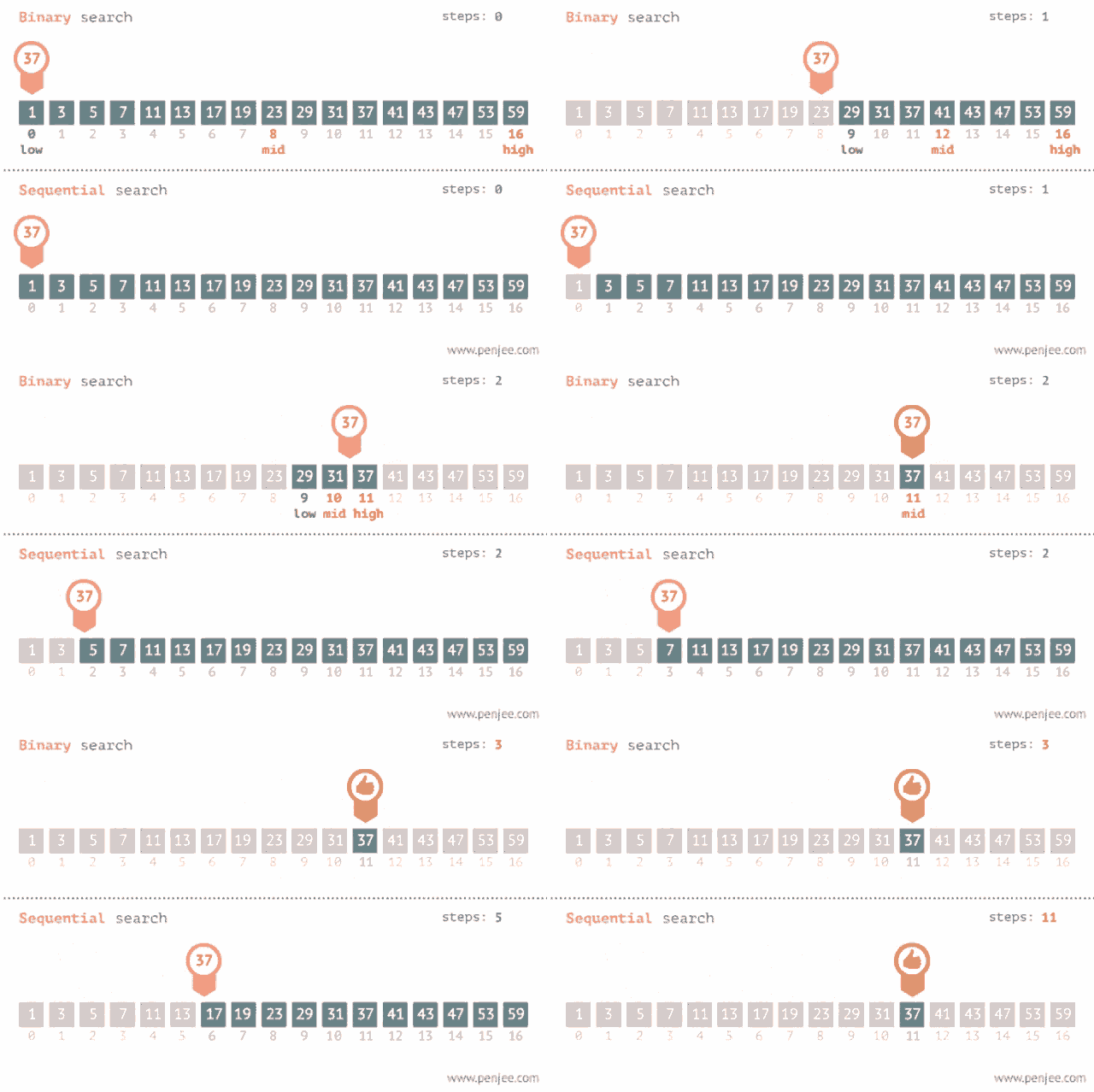
A side-by-side comparison
| Aspect | Linear Search | Binary Search |
|---|---|---|
| Requires sorted? | No | Yes |
| Best case | O(1) | O(1) |
| Worst case | O(n) | O(log n) |
| Space | O(1) | O(1) iterative / O(log n) recursive |
| Works on linked list? | Yes | No (random access needed) |
| Stable across data types? | Yes (just needs ==) | Needs < comparison too |
| Implementation | 4 lines | 8 lines + careful off-by-one |
Binary search is one of those algorithms where the complexity wins, but the implementation bites. Off-by-one errors are notorious. The next page introduces a unified template that eliminates them entirely.
Quick check
You’ve got the two searches and why sorted data unlocks O(log n). Next: The Binary Search Template — one piece of code, dozens of problems, zero off-by-one errors.